MCP UI blocks
Fenced blocks an agent emits that render as components.
Where this comes from
The idea is MCP UI — that a model should be able to return something the client renders, not just text describing it. The name and the concept come from the MCP-UI project, which introduced it for the Model Context Protocol: a server replies with a UI resource and the host displays it.
Runspace takes the same idea and makes it cheap. There is no protocol to implement and no resource type to negotiate — an agent writes a fenced code block in its ordinary reply, and the frontend renders it. Anything that can produce markdown can produce a chart, which is the point: it works the same whether the answer came from Agentino, Claude Code, Codex, OpenClaw or pi.
Every screenshot below comes from Almanac,
whose agents are open source — the prompts that produce these blocks are in
islavutin-oss/almanac, under
agents/*/SOUL.md.
The blocks
An agent can emit a fenced block and the frontend renders it as a real
component instead of code. Seven block types ship — chart, datatable,
kpi, insight, form, file and mermaid — and chart alone covers ten
kinds of plot. Every one of them is illustrated below.
Five show the reader something. form collects something back, and file
hands something over.
Every screenshot below is from a live demo, not a mock-up — the numbers are whatever the data said when the page was captured.
The key names below are the canonical ones, but the renderers accept the
obvious synonyms — title for headline, headers for columns, href for
url, x/y for xKey/yKey. Models reach for those constantly, and
refusing them meant a reader saw a schema complaint where a correct answer
should have been. The canonical name always wins when both are present.
A block that genuinely cannot be understood renders a visible error rather than silently doing nothing, so the mistake shows up in development instead of in front of a user.
chart
```chart
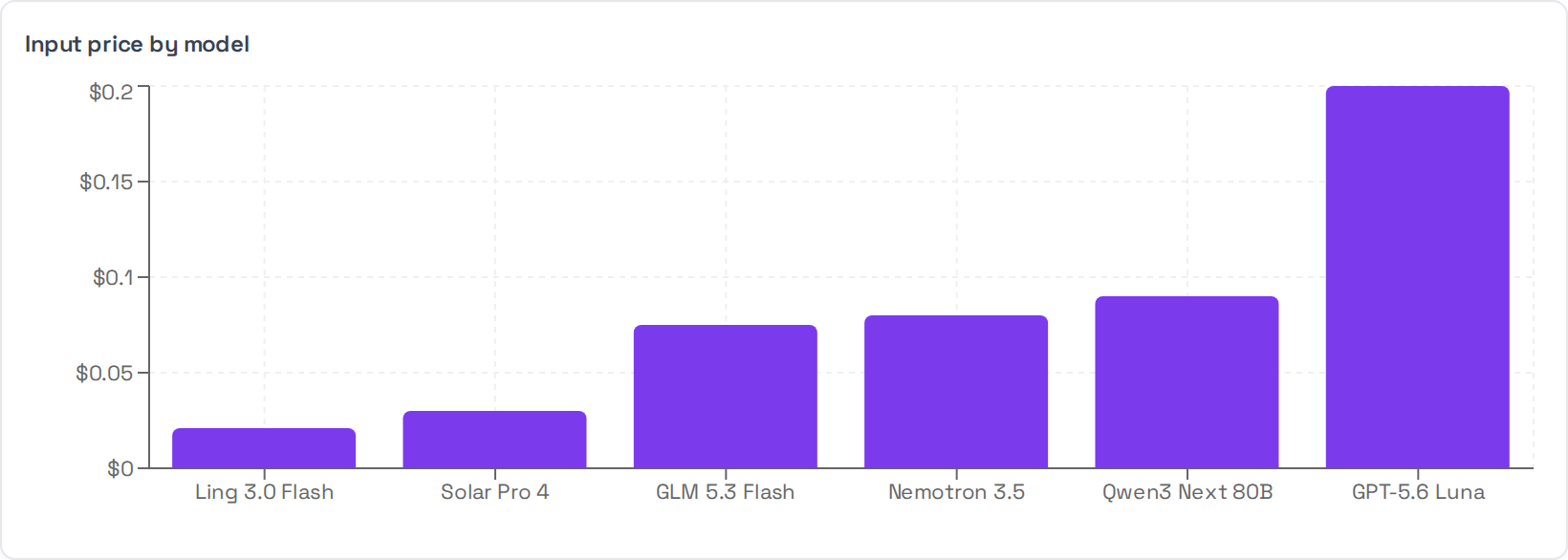
{"type": "bar", "title": "Input price by model",
 "data": [{"model": "Ling 3.0 Flash", "usd": 0.021}, {"model": "Solar Pro 4", "usd": 0.03}],
 "xKey": "model", "yKey": "usd", "yFormat": "currency"}
```
data is a list of flat objects; xKey and yKey name which of their keys to
plot. yFormat may be number, percent or currency — currency defaults to
a dollar sign and takes a currency key to change it.
Ten types ship. Each one below is the real component rendering real data.
bar
The default, and usually the right answer for a category against a value.
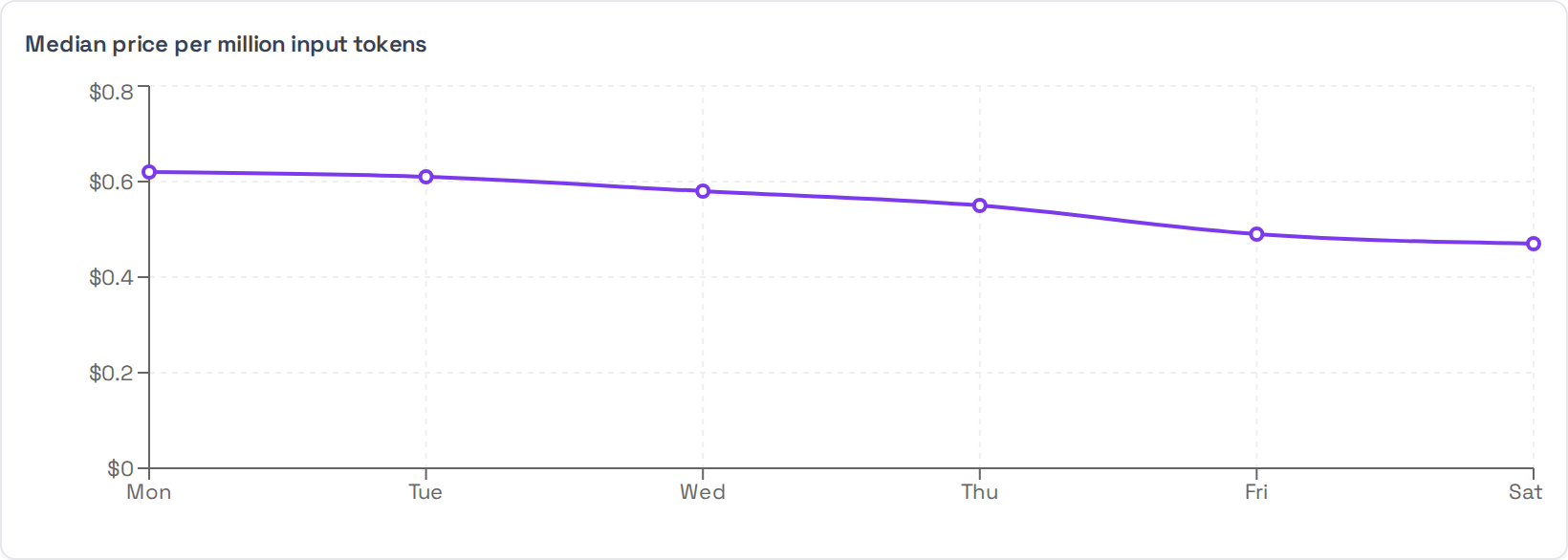
line
A value over an ordered axis, when the shape between points means something.
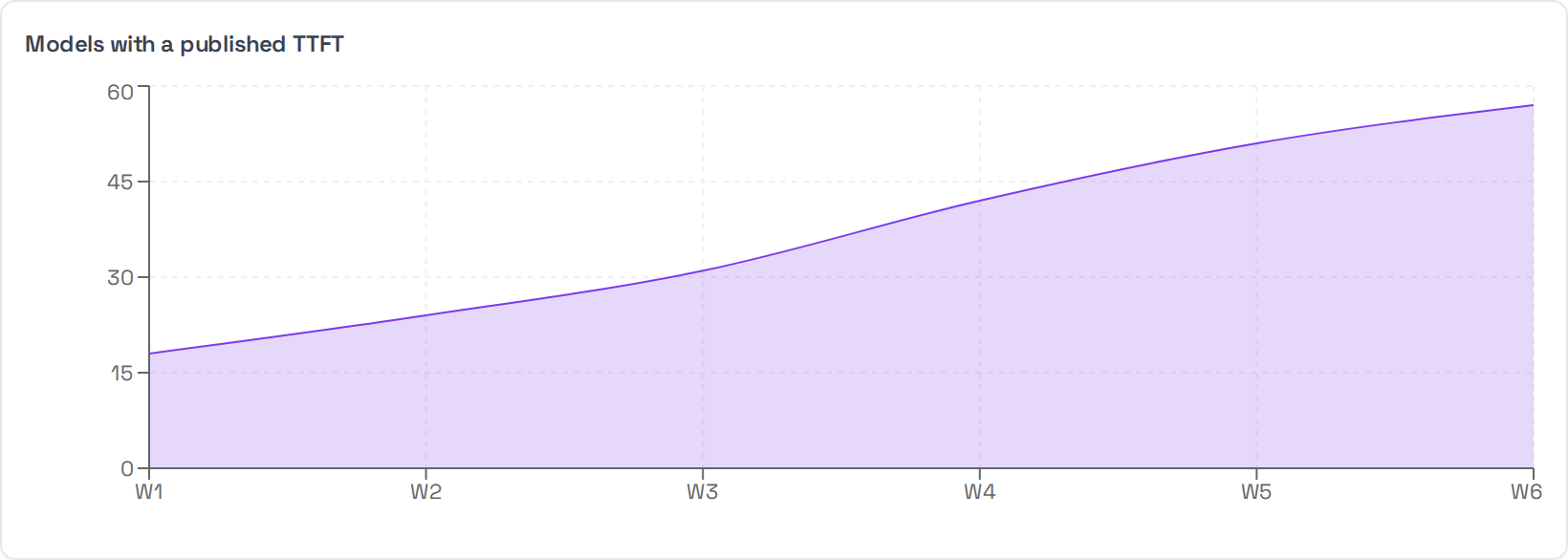
area
A line where the magnitude beneath it is part of the point — a total accumulating, a share filling up.
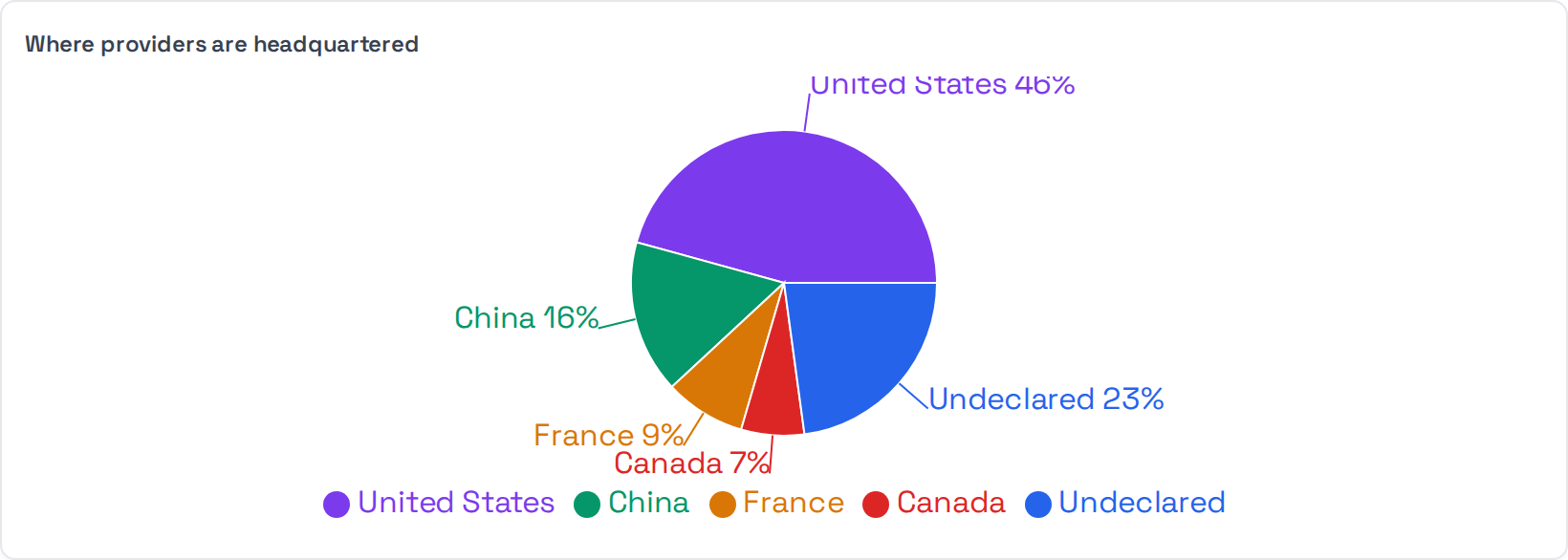
pie
Composition, and only when the parts genuinely sum to a whole. Slices are labelled with their share, so a reader is not estimating angles.
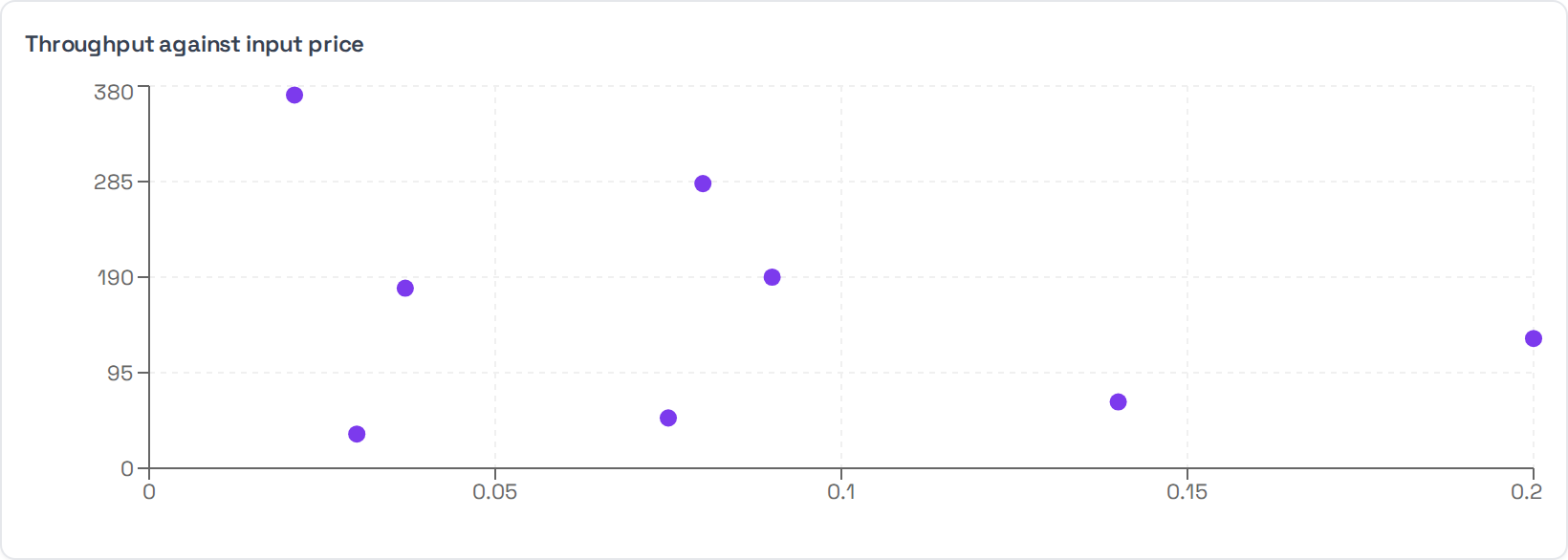
scatter
Two measurements against each other, when the question is whether they are related at all. Both axes are numeric.
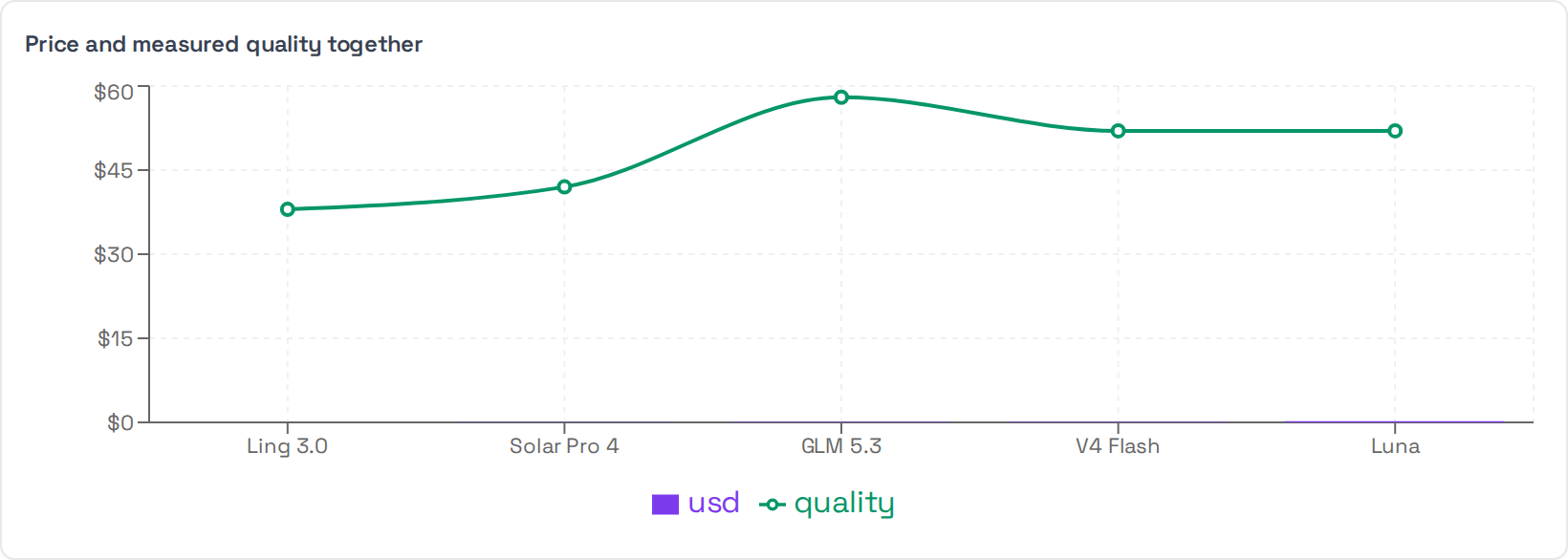
composed
Two series on one frame with independent axes — bars for one, a line for the
other. Add y2Key for the second series, and y2Color if the default clashes.
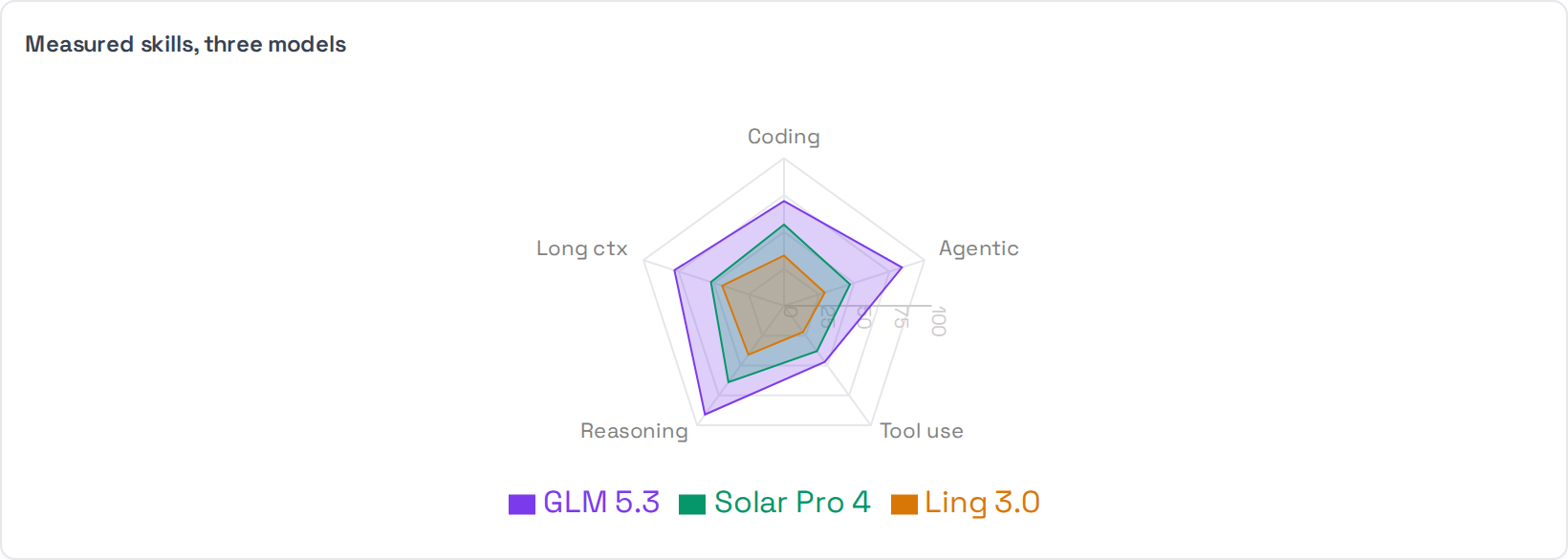
radar
Several things scored on the same set of axes. Name the series in radarKeys;
each row of data is one axis with a value per series.
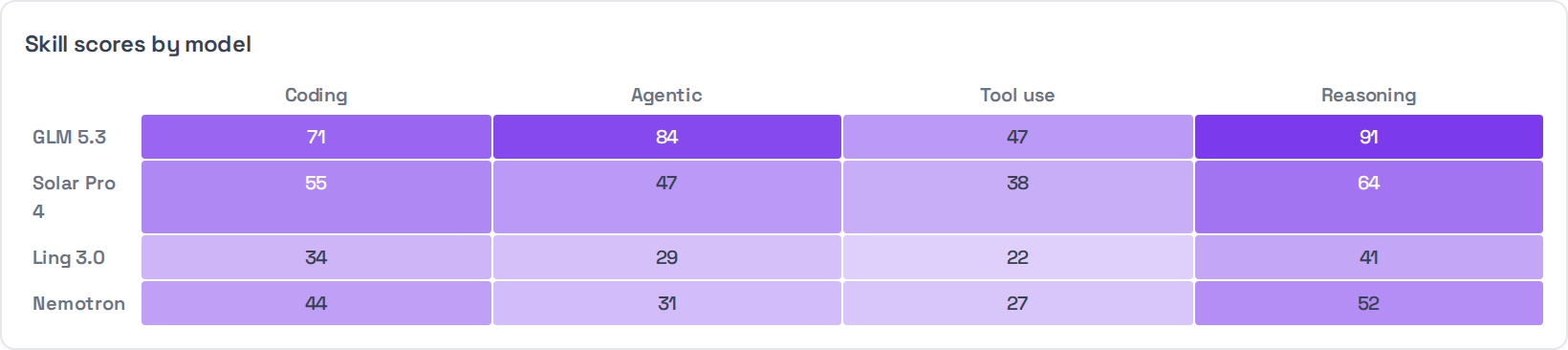
heatmap
A grid where colour carries the value. Give it columns, rows and a
valueKey; each data row names its cell.
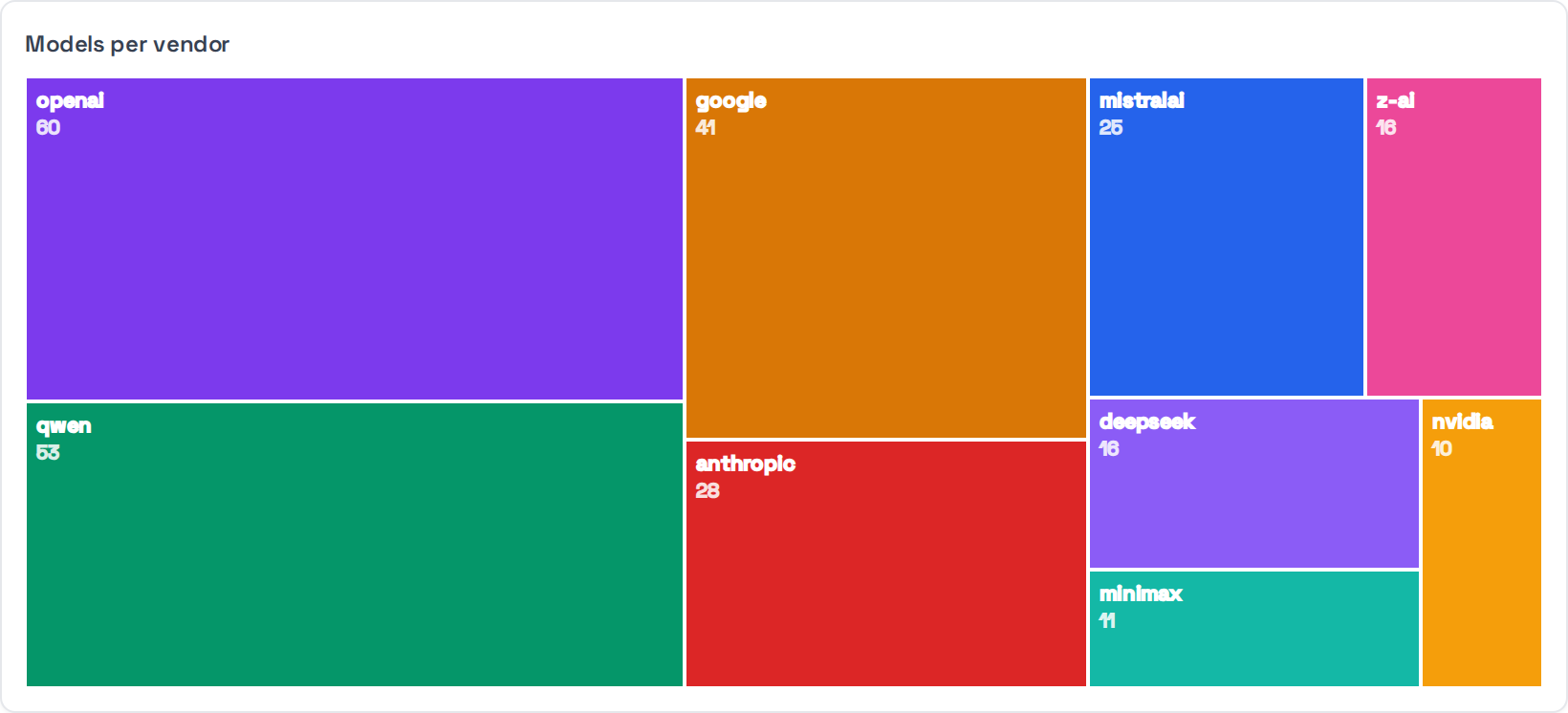
treemap
Relative size across many categories, when a bar chart would need thirty bars. Cells are labelled with the category and its value.
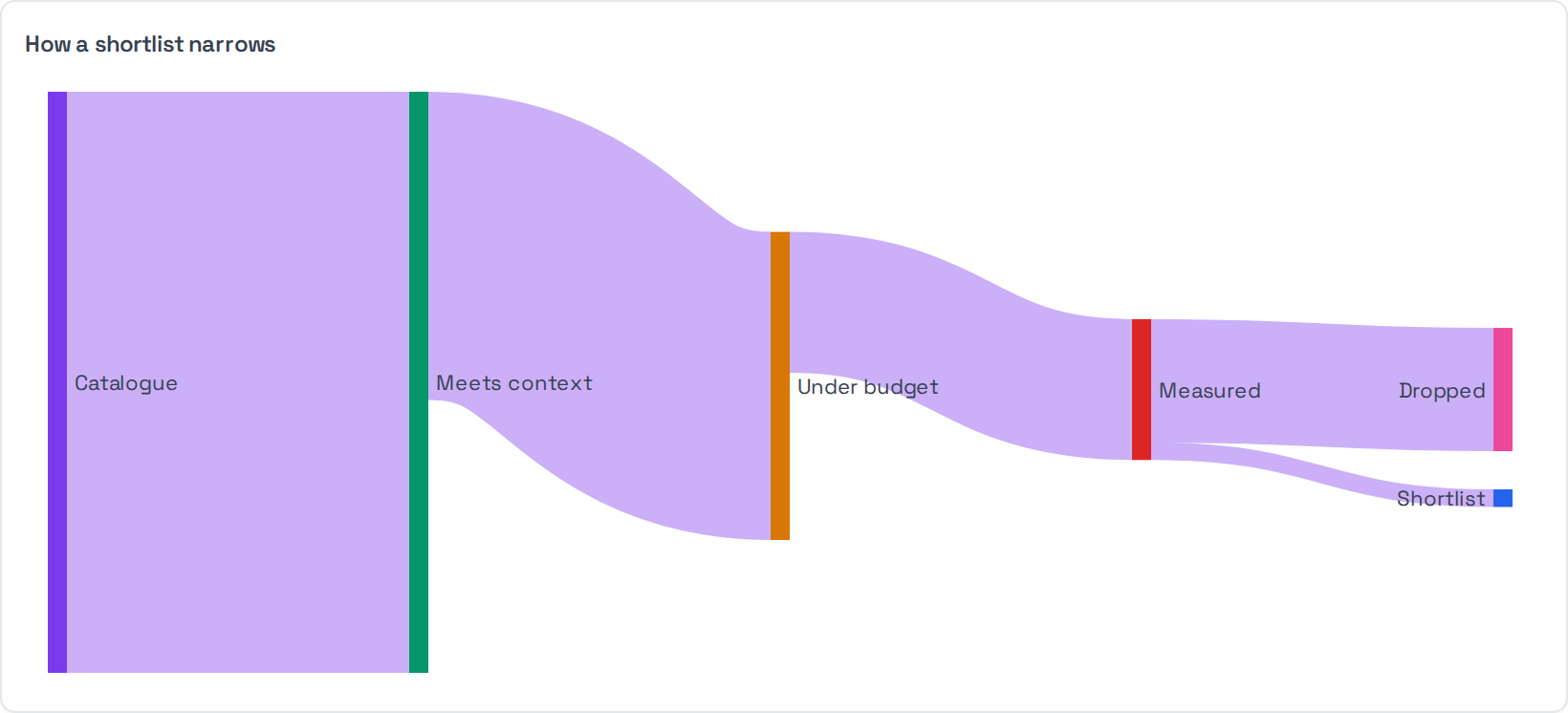
sankey
Flow through stages — how a population narrows, where volume goes. Supply
nodes and links instead of the usual data:
```chart
{"type": "sankey", "title": "How a shortlist narrows",
 "nodes": [{"name": "Catalogue"}, {"name": "Meets context"}, {"name": "Shortlist"}],
 "links": [{"source": 0, "target": 1, "value": 396},
           {"source": 1, "target": 2, "value": 12}]}
```
Interaction
Any chart can be made clickable. clickHrefKey names a key on each datum
holding a link to follow; clickPromptKey holds a question to send back to the
agent, so clicking a bar asks about the thing it represents.
legendPromptTemplate does the same for legend entries, with {name}
substituted.
Every chart also carries CSV and PNG buttons, so a reader can take the data away rather than retyping it.
datatable
```datatable
{"title": "Season summary", "columns": ["Season", "Home wins", "Rate"],
 "rows": [["2020/21", "144", "37.9%"], ["2019/20", "172", "45.5%"]]}
```
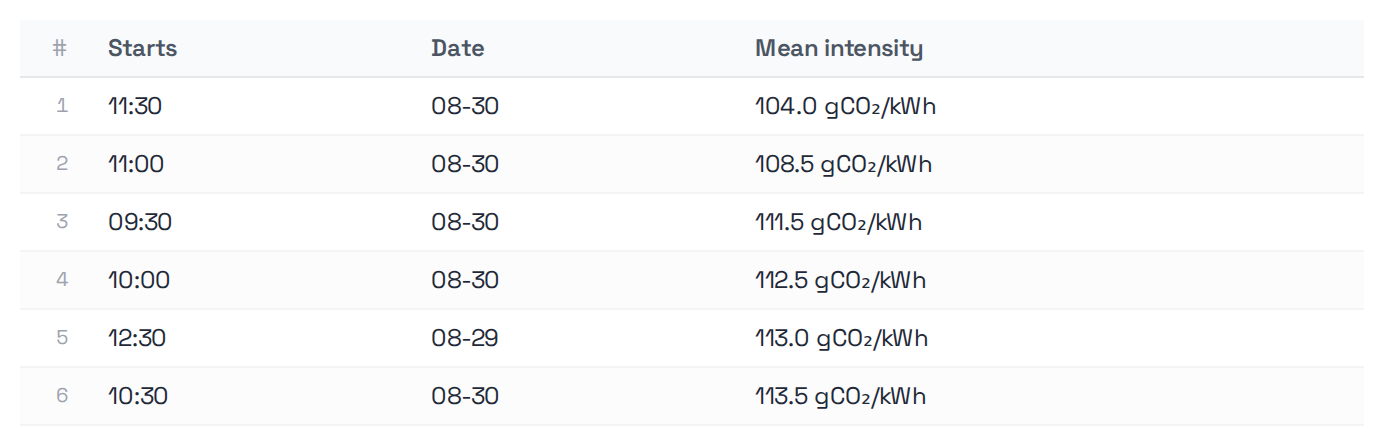
columns and rows are required. Rows can carry links, expandable detail and
per-row actions that dispatch a follow-up prompt.
kpi
```kpi
[{"title": "Models listed", "value": "396", "subtitle": "on OpenRouter"},
 {"title": "Latency measured", "value": "14%", "subtitle": "57 with a published TTFT"}]
```

title and value are required. A card without title renders as a bare
number, which tells the reader nothing.
insight
```insight
{"kind": "insight", "headline": "Most of the catalogue is unmeasured on latency",
 "body": "339 of 396 listings publish no time to first token. Unmeasured, not fast."}
```

headline is required and is the whole point of the block. kind is one of
insight, warning, opportunity, risk.
form
The others render an answer. This one asks a question and gets a reply.
```form
{"title": "Start a conversation",
 "body": "Leave a way to reach you.",
 "fields": [{"key": "name", "label": "Name", "required": true},
            {"key": "contact", "label": "Email or Telegram", "required": true},
            {"key": "detail", "label": "What you are working on", "type": "textarea"}],
 "submitLabel": "Send",
 "prompt": "Please pass this on: {name} ({contact}) — {detail}",
 "done": "Sent."}
```
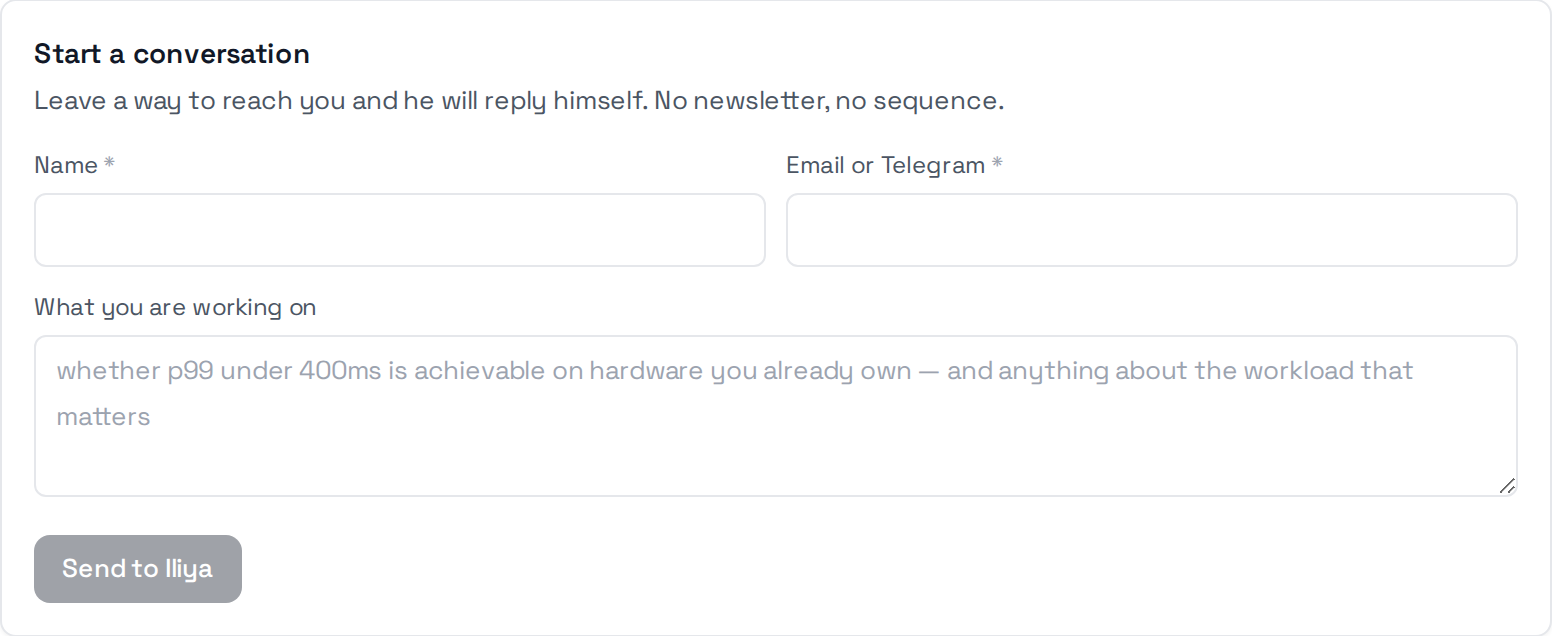
There is deliberately no submit endpoint. Submitting dispatches a widget intent — the same mechanism a chart click uses — so the values arrive as an ordinary turn the agent can act on with a tool. No new backend route, no server-side form state, and it works in any host that already renders these blocks.
type may be text, email, tel or textarea. required gates the submit
button; whitespace does not satisfy it. prompt is sent on submit with {key}
placeholders filled in — a placeholder with no matching field becomes an empty
string rather than a literal brace. done replaces the form once it has sent.
Where no chat host is wired up, the button is disabled and says so rather than silently doing nothing.
file
Something the agent generated that the reader should keep — a report to circulate, a spreadsheet to diff next month. Write the artefact through the workspace's file storage, then emit the block with the URL you get back.
```file
{"name": "almanac-shortlist-20260830.csv",
 "url": "/api/workspace/files/abc123",
 "kind": "csv", "size": 6144,
 "caption": "What is in it, and what it does not cover."}
```

name and url are required; kind picks the icon (csv, markdown,
json, text). size is shown so nobody opens a large download by accident.
Only workspace-relative URLs render. An off-site or javascript: URL shows a
visible refusal instead — a download row is exactly what a reader clicks
without looking, and an agent is not a trusted source of URLs. Protocol-relative
//host/path counts as off-site.
Attach a file alongside the answer, never instead of one.
mermaid
```mermaid
flowchart LR
  feeds[Feeds in] --> filter[Relevance filter]
  filter --> filed{Already filed?}
  filed -- no --> publish[Publish digest]
  filed -- yes --> quiet[Stay silent]
```
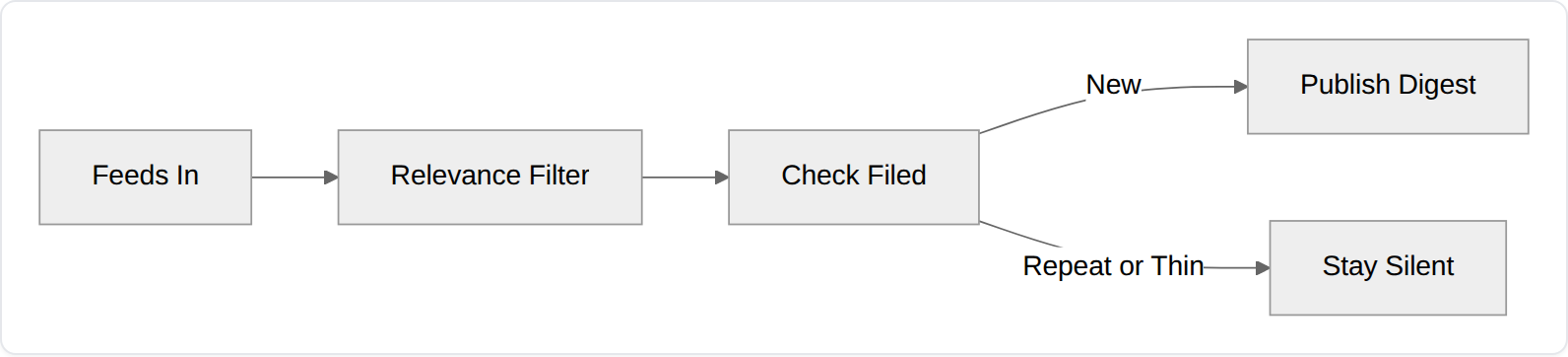
Rendered natively — no library to add. Unlike the four above it carries no JSON payload, so there is nothing to validate: a diagram that does not parse shows mermaid's own error rather than an error box.
Useful when the answer is a process rather than a number — an escalation path, a state machine, how a request moves through a system.
Where to emit them
From a tool, when the shape is known — the tool returns the block and the agent passes it through. That is deterministic and cannot be got wrong by a model having an off day.
From the agent, when the shape depends on the question. If you do this, put the
schemas in the SOUL. An agent told "use a kpi block" without being shown the
keys will guess, and it will guess wrong often enough to matter.